Event JSON
{
"id": "b231d5df2666235000f66cfb5195d6e9e4831d70fb9b48fa79028610aca865f3",
"pubkey": "def4899a1720f6f33d3ae6b0290566a36921587541202cad83074dbf12b71742",
"created_at": 1735420798,
"kind": 1,
"tags": [
[
"t",
"emacs"
],
[
"t",
"programming"
],
[
"proxy",
"https://mastodon.social/@susam/113732537447740654",
"web"
],
[
"imeta",
"url https://files.mastodon.social/media_attachments/files/113/732/526/837/081/634/original/64d58c17cf3e9c4d.png",
"m image/png"
],
[
"proxy",
"https://mastodon.social/users/susam/statuses/113732537447740654",
"activitypub"
],
[
"L",
"pink.momostr"
],
[
"l",
"pink.momostr.activitypub:https://mastodon.social/users/susam/statuses/113732537447740654",
"pink.momostr"
],
[
"-"
]
],
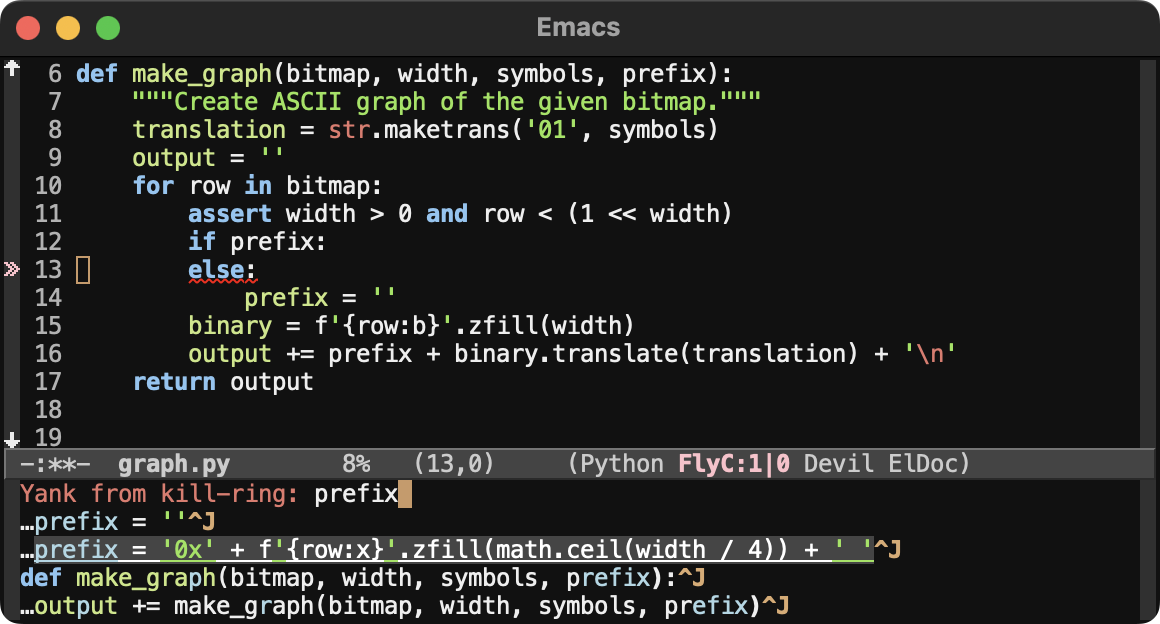
"content": "Imagine this. You are editing an important piece of code or text in Emacs, refining it, and removing imperfections.\n\nBut then you realise—you've accidentally deleted a crucial line or paragraph! You're not sure when it happened, but you need that text back. Immediately!\n\nWhat do you do?\n\nJust type M-y to browse the kill ring, search for the lost text, let your completion framework find a match, and when you do, type RET to insert it back into your buffer. Problem solved!\n\n#emacs #programming\nhttps://files.mastodon.social/media_attachments/files/113/732/526/837/081/634/original/64d58c17cf3e9c4d.png\n",
"sig": "29dbf3cb4657bd9038b23fcafae1117aa43800a06a05bd88ff3cb0f993dec5ad21a527af4a30c6c2886ff404f57488a6b115971adabcfa34210e9717d5e5c7b8"
}